

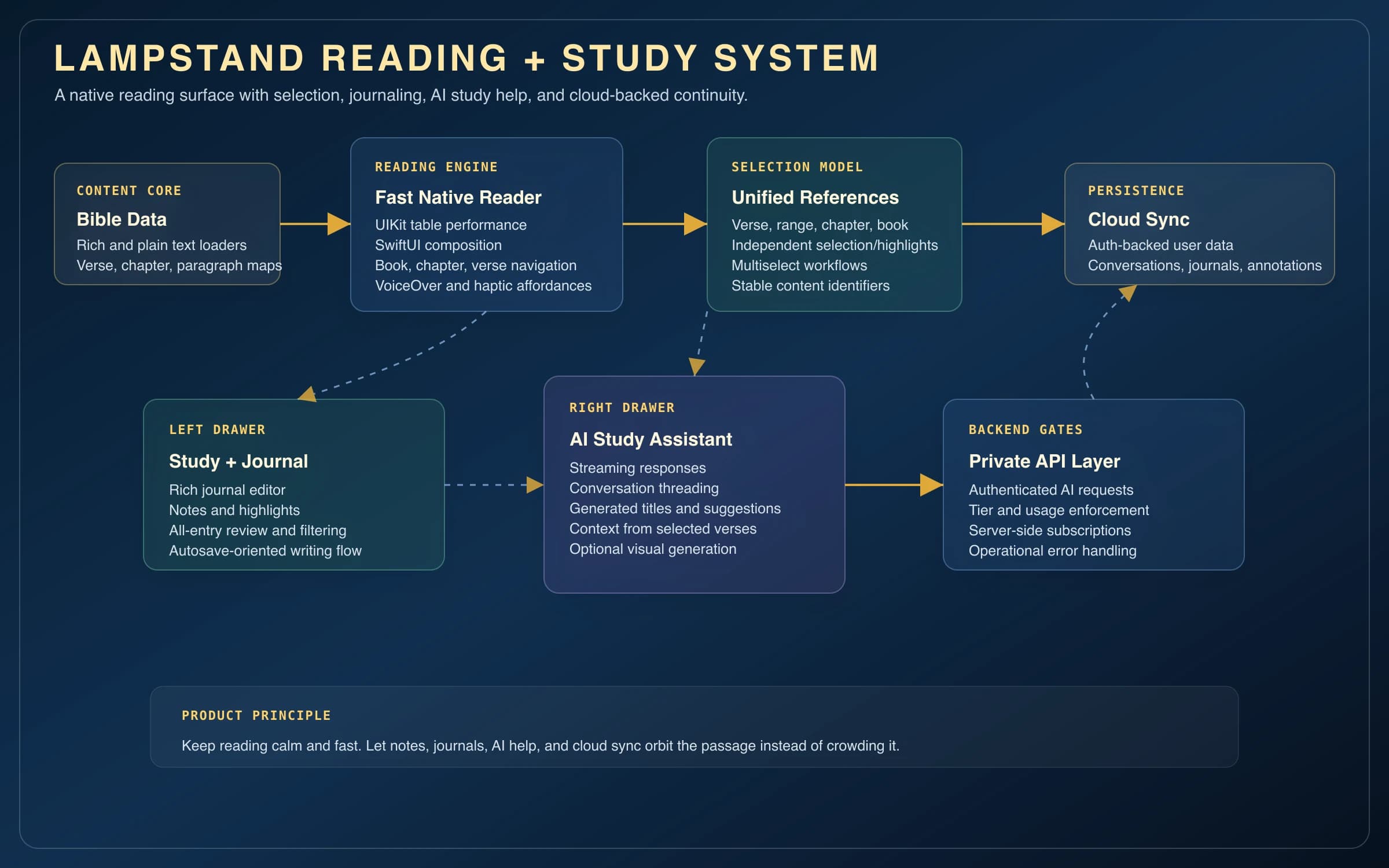

Challenge
Lampstand started as a personal experiment, a test of a single mechanic. I wanted verse navigation with no menus at all, just a floating dial picker styled after the iOS time picker. Making that feel effortless meant resolving book, chapter, and verse lookups and scroll-position math fast enough to land smoothly on any of 31,000+ verses while the dials are still settling. Once that worked, the harder question became how to add notes, journals, AI help, and sync without letting those tools compete with the passage.
Approach
One rule shaped everything. The passage is the product, and every other feature has to earn its place around it.
- Built the dial navigator first, since the whole product bet depended on book, chapter, and verse navigation feeling instant across the full text.
- Used a UIKit-backed scrolling engine inside a SwiftUI app shell so long-form reading stays responsive while the rest of the product can use modern SwiftUI composition.
- Built a unified content reference model for verses, ranges, chapters, books, and paragraphs so selection, highlights, notes, and future study actions can point to the same content shape.
- Kept study tools in persistent drawers: a left-side journal and annotation workspace, and a right-side AI assistant with chat history, streaming responses, and context-aware study support.
- Moved sync, authentication, AI requests, generated image storage, metadata generation, and usage enforcement behind Firebase and Vercel-backed services instead of baking those concerns into the reader surface.
Native reading surface
The reader is the product anchor. Lampstand loads structured Bible content, builds verse/chapter/paragraph lookup maps, and renders the long passage surface through a UITableView wrapper so the app can keep smooth scrolling while still living inside a SwiftUI interface.
- Rich Bible data can fall back to plain text so the reading flow still works if richer content is unavailable.
- The floating dial picker handles book, chapter, and verse navigation, with fallback behavior for missing or invalid targets.
- Floating controls and auto-hiding chrome keep navigation reachable without permanently occupying the reading surface.
Selection model
The most important internal abstraction is the unified content reference. Verses, ranges, chapters, books, and paragraphs can be represented through one content shape, which gives highlights, notes, multiselect, and AI context a shared contract.
- Selection and highlighting are modeled independently so one interaction does not erase the other.
- Content IDs are stable enough to persist notes and highlights across sessions.
- Multiselect can grow into actions like ask AI, add to journal, and bookmarking without reshaping the reader.
Study and AI drawers
Lampstand keeps heavier tools adjacent to the passage instead of embedding them directly into the text. Persistent off-screen drawers preserve state for the left-side journal workspace and the right-side AI assistant, while the main reader can stay focused.
- The journal side supports rich text editing, entry lists, soft deletion, caching, and Firestore-backed persistence.
- The AI side supports chat conversations, pinned/recent chat behavior, streaming responses, metadata generation, and generated visual support.
- Drawer gestures, keyboard shortcuts, haptics, and accessibility handling are coordinated outside the view body for testability.
Cloud and backend services
The backend work keeps private AI and account behavior outside the client. Firebase handles identity and user-scoped data, while Vercel functions handle authenticated AI requests, generated image storage, chat metadata, and usage enforcement.
- Conversations, messages, journals, and annotations are stored under authenticated user scope.
- Server-side functions enforce usage limits and tier behavior before expensive AI operations run.
- Streaming chat uses response threading so study conversations can preserve context over time.