


Challenge
Dr. Steve Krakora, an oral surgeon, wanted to follow up with every patient after procedures without turning routine outreach into manual work. His vision had to be built inside HIPAA and, more surprisingly, outside FDA software-as-a-medical-device territory, a line that shaped what the AI was allowed to decide on its own.
Approach
Automation was never the goal. The real design work was deciding where a clinician has to stay in the loop.
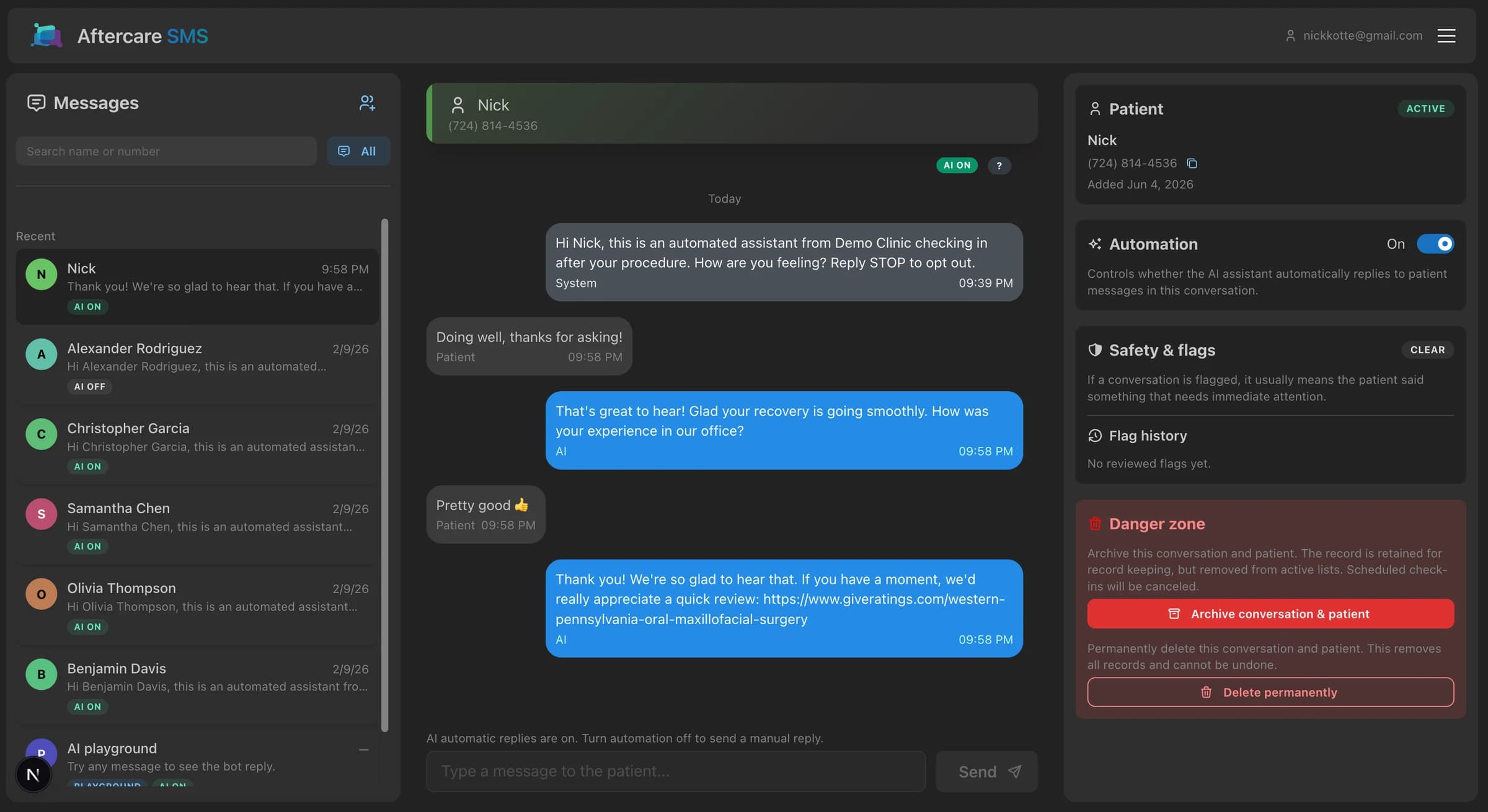
- Designed the core workspace around the way clinic staff actually triage: conversation list, patient thread, management panel, automation state, safety flags, and manual reply controls in one screen.
- Built AI-assisted reply handling so routine messages can be answered quickly while uncertain or high-risk situations fail closed into clinician review.
- Added scheduling and roster workflows so initial check-ins can be immediate or delayed, patients can be added individually or imported in bulk, and opt-outs are enforced throughout the product.
- Modeled multi-clinic access, staff roles, audit events, and operational guardrails around a regulated healthcare workflow instead of treating automation as a standalone chatbot.
- Chose HIPAA-compliant infrastructure deliberately, saving thousands compared to typical healthcare hosting, and automated the reports, alerts, and monitoring so the practice does not need an IT team behind it.
Clinician workspace
The main dashboard is organized around conversation triage. Staff can search and filter patient threads, read the full message history, send manual replies, inspect patient status, toggle automation, and resolve flagged conversations without leaving the core workspace.
- Conversation filters separate all, flagged, active, scheduled, and testing threads.
- Thread labels make patient, clinician, AI, and system activity visible without exposing implementation detail.
- The management panel keeps automation, safety review, patient status, archive, and delete actions close to the conversation.
Automation and safety
AI assistance is deliberately bounded. Routine replies can move quickly, but open safety flags, pending internal drafts, ended conversations, and opt-outs pause automation so staff stay responsible for judgment calls.
- High-risk messages are surfaced as flags and can notify configured clinical contacts.
- Unclear AI output can become an internal draft for staff review, edit, approval, or deletion before anything is sent.
- Manual takeover is always available, and automation is controlled per conversation rather than globally forced.
Scheduling and roster operations
Aftercare supports the operational work around follow-up, not just the message thread. Clinic settings control when initial check-ins send, staff can add patients one at a time or in bulk, and scheduled check-ins can be sent sooner or canceled from the conversation.
- Initial check-ins can be immediate or delayed against clinic-local timing rules.
- Patient import handles normalized names and phone numbers while preserving opt-out constraints.
- Scheduled check-in state appears in the list and thread so staff can see what is pending.
Clinic operations
The system is built for more than one clinic. Tenant routing, staff access, administrative tooling, audit events, and real-time updates are treated as product requirements because patient conversations and clinical review workflows need clear ownership.
- Clinic-scoped access keeps staff, patients, conversations, settings, and SMS routing separated.
- Admin tools cover clinic lifecycle, user invitations, role/status changes, and security resets.
- Audit logging records sensitive access and mutation events while minimizing patient-data exposure in logs.